Create a Guest VLAN, Limit Bandwidth, and Configure Captive Portal on OPNsense

Nghia Phan
Table of Contents
⚠️ Cảnh báo
Outdated
💡 Mẹo hay
See the OPNsense configuration series.
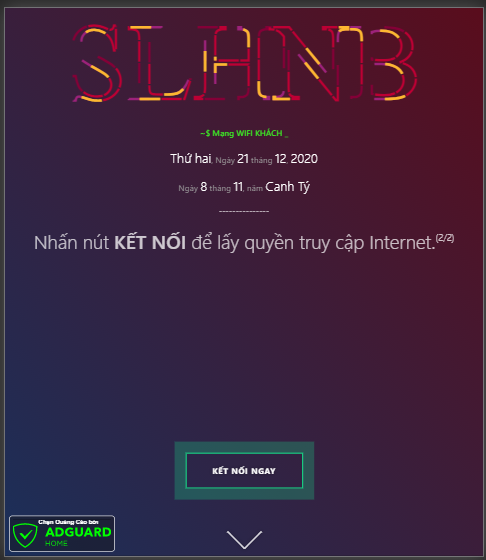
A Guest VLAN allows one LAN port to carry separate networks, which is useful on routers with limited ports. It can provide free guest Wi-Fi, limit guest speed, use a separate DHCP server, or show a captive-portal page before Internet access.
The Wi-Fi access point and its firmware must support Guest VLAN configuration, such as OpenWrt, PandoraBox, or DD-WRT.
📂 Captive Portal demo ▼
Add a VLAN
- Open Interfaces > Other Types > VLAN and click Add.
| Field | Value | Notes |
|---|---|---|
| Parent interface | re0 (LAN) | Select the port carrying the VLAN. A router needs at least two ports. |
| VLAN Tag | 10 | Use the VLAN ID selected for Guest. |
| VLAN priority | 0 (default) | Leave the default unless a specific QoS policy requires another value. |
| Description | Guest NET |
Click Save.
Assign the VLAN interface
- Open Interfaces > Assignments.
- Under New interface, select
vlan 10 on re0 (Guest NET). - Set the description to
GUESTNETand edit the new interface. - Enable it and configure:
| Field | Value | Notes |
|---|---|---|
| Block Private networks | Unchecked | |
| Block Bogon networks | Unchecked | |
| IPv4 Configuration Type | Static IPv4 | |
| IPv6 Configuration Type | None | |
| MAC / MTU / MSS | Empty | |
| Speed and Duplex | Default | |
| Static IPv4 Address | 192.168.x.1/24 | Choose a subnet different from the main LAN. |
| IPv4 Upstream Gateway | Auto-detect |
Click Save.
Configure DHCP for Guest
- Open Services > DHCPv4 > GUESTNET.
| Field | Value |
|---|---|
| Enable | Checked |
| Range | 192.168.100.2 – 192.168.100.254 |
| DNS Server | 192.168.100.1 |
| Gateway | 192.168.100.1 |
Configure the Guest firewall
Open Firewall > Rules > GUESTNET.
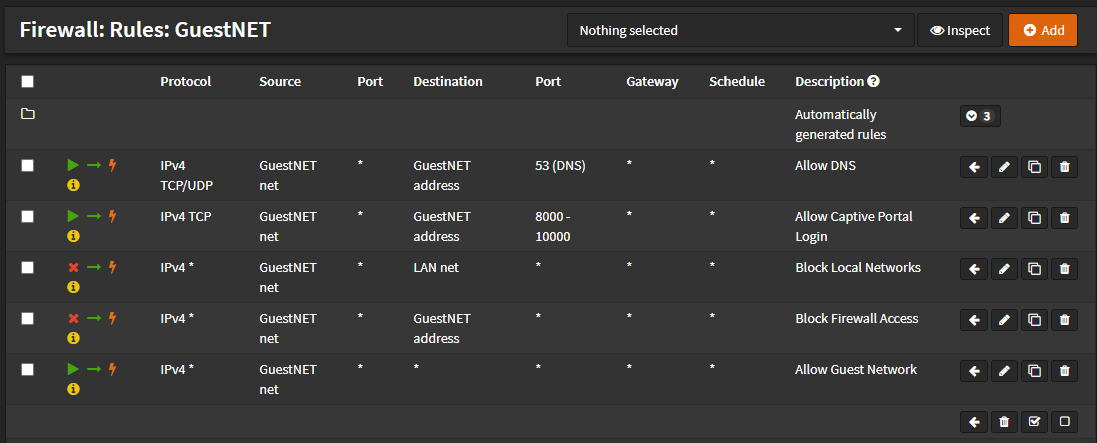
Allow DNS
| Field | Value |
|---|---|
| Action | PASS |
| Interface | GUESTNET |
| Protocol | TCP/UDP |
| Source | GUESTNET net |
| Destination | GUESTNET Address |
| Destination port | DNS/DNS |
| Category | GuestNet Basic Rules |
| Description | Allow DNS |
Save the rule.
Allow captive-portal login
| Field | Value |
|---|---|
| Action | PASS |
| Interface | GUESTNET |
| Protocol | TCP |
| Source | GUESTNET net |
| Destination | GUESTNET Address |
| Destination port | 8000/10000 |
| Category | GuestNet Basic Rules |
| Description | Allow Captive Portal Login |
Save the rule.
Block Guest access to the main LAN
Create a block rule with:
| Field | Value |
|---|---|
| Action | Block |
| Interface | GUESTNET |
| Protocol | any |
| Source | GUESTNET net |
| Destination | LAN Net |
| Description | Block Local Networks |
Create another block rule with destination Guest Address and description Block Firewall Access.
Allow Guest Internet access
| Field | Value |
|---|---|
| Action | Pass |
| Interface | GUESTNET |
| Protocol | any |
| Source | GUESTNET net |
| Destination | any |
| Destination port | any |
| Description | Allow Guest Network |
Save all rules and click Apply Changes.
📂 GuestNET firewall rules ▼
Configure the captive portal
The captive-portal configuration is covered in the separate Captive Portal guide.
Tags:
#opnsense
Comments & Discussion
Share your thoughts, ask questions and feedback