How to Connect NordVPN and Isolate VPN Traffic on a Separate AP (Part 2)

Outdated
This is an advanced configuration. You should understand the OPNsense menus and have a recovery path before changing VPN routing.
See Part 1 — Add a VLAN and assign it to an interface.
II. Configure NordVPN on OPNsense
1. Configure the VPN client
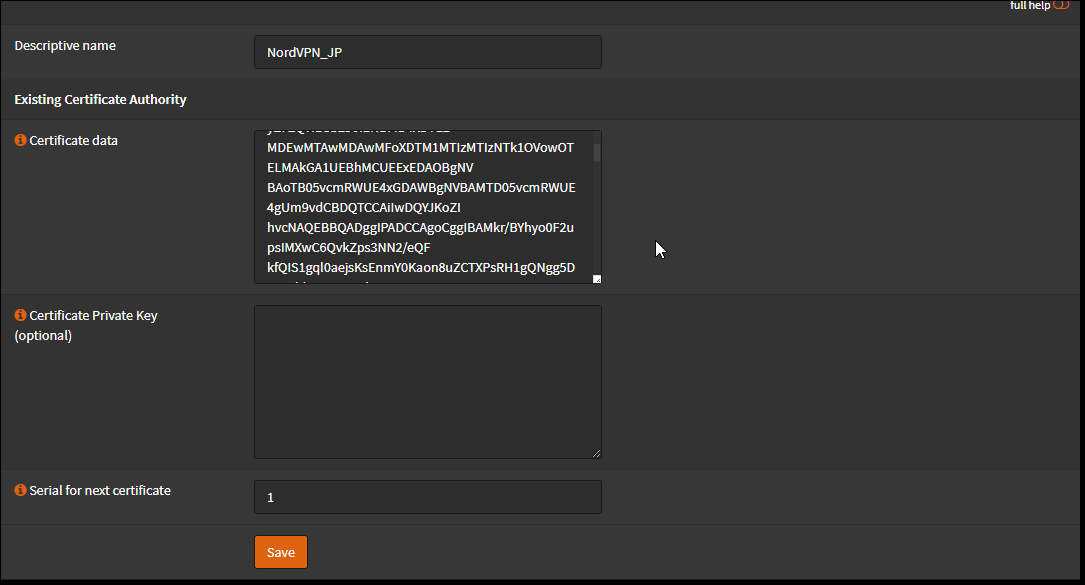
Open System → Trust → Authorities, click +Add, and create a certificate authority.
Enter:
- Descriptive Name:
NordVPN_CA - Method: Import an existing Certificate Authority
- Certificate data: paste the following certificate.
-----BEGIN CERTIFICATE-----MIIFCjCCAvKgAwIBAgIBATANBgkqhkiG9w0BAQ0FADA5MQswCQYDVQQGEwJQQTEQMA4GA1UEChMHTm9yZFZQTjEYMBYGA1UEAxMPTm9yZFZQTiBSb290IENBMB4XDTE2MDEwMTAwMDAwMFoXDTM1MTIzMTIzNTk1OVowOTELMAkGA1UEBhMCUEExEDAOBgNVBAoTB05vcmRWUE4xGDAWBgNVBAMTD05vcmRWUE4gUm9vdCBDQTCCAiIwDQYJKoZIhvcNAQEBBQADggIPADCCAgoCggIBAMkr/BYhyo0F2upsIMXwC6QvkZps3NN2/eQFkfQIS1gql0aejsKsEnmY0Kaon8uZCTXPsRH1gQNgg5D2gixdd1mJUvV3dE3y9FJrXMoDkXdCGBodvKJyU6lcfEVF6/UxHcbBguZK9UtRHS9eJYm3rpL/5huQMCppX7kUeQ8dpCwd3iKITqwd1ZudDqsWaU0vqzC2H55IyaZ/5/TnCk31Q1UP6BksbbuRcwOVskEDsm6YoWDnn/IIzGOYnFJRzQH5jTz3j1QBvRIuQuBuvUkfhx1FEwhwZigrcxXuMP+QgM54kezgziJUaZcOM2zF3lvrwMvXDMfNeIoJABv9ljw969xQ8czQCU5lMVmA37ltv5Ec9U5hZuwk/9QO1Z+d/r6Jx0mlurS8gnCAKJgwa3kyZw6e4FZ8mYL4vpRRhPdvRTWCMJkeB4yBHyhxUmTRgJHm6YR3D6hcFAc9cQcTEl/I60tMdz33G6m0O42sQt/+AR3YCY/RusWVBJB/qNS94EtNtj8iaebCQW1jHAhvGmFILVR9lzD0EzWKHkvyWEjmUVRgCDd6Ne3eFRNS73gdv/C3l5boYySeu4exkEYVxVRn8DhCxs0MnkMHWFK6MyzXCCn+JnWFDYPfDKHvpff/kLDobtPBf+Lbch5wQy9quY27xaj0XwLyjOltpiSTLWae/Q4vAgMBAAGjHTAbMAwGA1UdEwQFMAMBAf8wCwYDVR0PBAQDAgEGMA0GCSqGSIb3DQEBDQUAA4ICAQC9fUL2sZPxIN2mD32VeNySTgZlCEdVmlq471o/bDMP4B8gnQesFRtXY2ZCjs50Jm73B2LViL9qlREmI6vE5IC8IsRBJSV4ce1WYxyXro5rmVg/k6a10rlsbK/eg//GHoJxDdXDOokLUSnxt7gk3QKpX6eCdh67p0PuWm/7WUJQxH2SDxsT9vB/iZriTIEe/ILoOQF0Aqp7AgNCcLcLAmbxXQkXYCCSB35Vp06u+eTWjG0/pyS5V14stGtw+fA0DJp5ZJV4eqJ5LqxMlYvEZ/qKTEdoCeaXv2QEmN6dVqjDoTAok0t5u4YRXzEVCfXAC3ocplNdtCA72wjFJcSbfif4BSC8bDACTXtnPC7nD0VndZLp+RiNLeiENhk0oTC+UVdSc+n2nJOzkCK0vYu0Ads4JGIB7g8IB3z2t9ICmsWrgnhdNdcOe15BincrGA8avQ1cWXsfIKEjbrnEuEk9b5jel6NfHtPKoHc9mDpRdNPISeVawDBM1mJChneHt59Nh8Gah74+TM1jBsw4fhJPvoc7Atcg740JErb904mZfkIEmojCVPhBHVQ9LHBAdM8qFI2kRK0IynOmAZhexlP/aT/kpEsEPyaZQlnBn3An1CRz8h0SPApL8PytggYKeQmRhl499+6jLxcZ2IegLfqq41dzIjwHwTMplg+1pKIOVojpWA==-----END CERTIFICATE-----Leave Certificate Private Key empty and keep Serial for next certificate at its default.
📂 Screenshot ▼
Click Save.
Open VPN → OpenVPN → Clients and click +Add.
General information:
| Field | Value |
|---|---|
| Disabled | Leave unchecked |
| Description | For example NordVPN_JP |
| Server mode | Peer to Peer (SSL/TLS) |
| Protocol | UDP4, or TCP4 if required |
| Device mode | tun |
| Interface | VPN_LAN |
| Remote server | Get a hostname from https://nordvpn.com/servers/tools/, for example vn21.nordvpn.com; use port 1194 for UDP or 443 for TCP |
| Retry DNS resolution | Checked |
| Proxy host / port | Empty |
| Proxy Authentication | None |
| Local port | Empty |
User authentication:
| Field | Value |
|---|---|
| Username/password | NordVPN username and password |
| Renegotiate time | Empty |
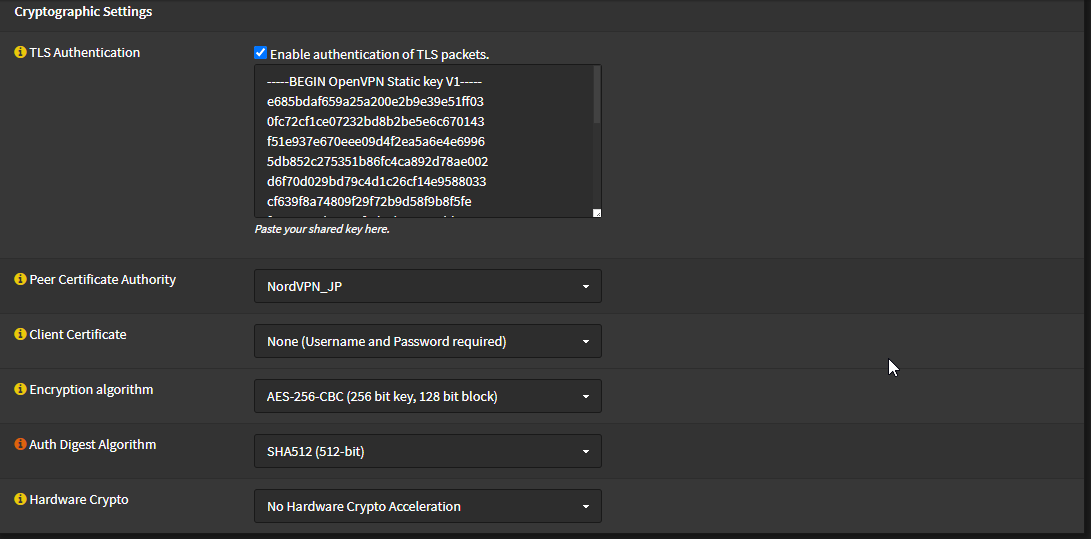
Cryptographic settings:
- Enable authentication of TLS packets: Enabled.
- Disable automatic TLS-key generation and paste the static key below.
-----BEGIN OpenVPN Static key V1-----e685bdaf659a25a200e2b9e39e51ff030fc72cf1ce07232bd8b2be5e6c670143f51e937e670eee09d4f2ea5a6e4e69965db852c275351b86fc4ca892d78ae002d6f70d029bd79c4d1c26cf14e9588033cf639f8a74809f29f72b9d58f9b8f5fefc7938eade40e9fed6cb92184abb2cc10eb1a296df243b251df0643d53724cdb5a92a1d6cb817804c4a9319b57d53be580815bcfcb2df55018cc83fc43bc7ff82d51f9b88364776ee9d12fc85cc7ea5b9741c4f598c485316db066d52db4540e212e1518a9bd4828219e24b20d88f598a196c9de96012090e333519ae18d35099427e7b372d348d352dc4c85e18cd4b93f8a56ddb2e64eb67adfc9b337157ff4-----END OpenVPN Static key V1------ Peer Certificate Authority:
NordVPN_CA. - Client Certificate: None; username and password are used.
- Encryption Algorithm: AES-256-CBC.
- Auth Digest Algorithm: SHA512.
- Hardware Crypto: No hardware acceleration.
📂 Screenshot ▼
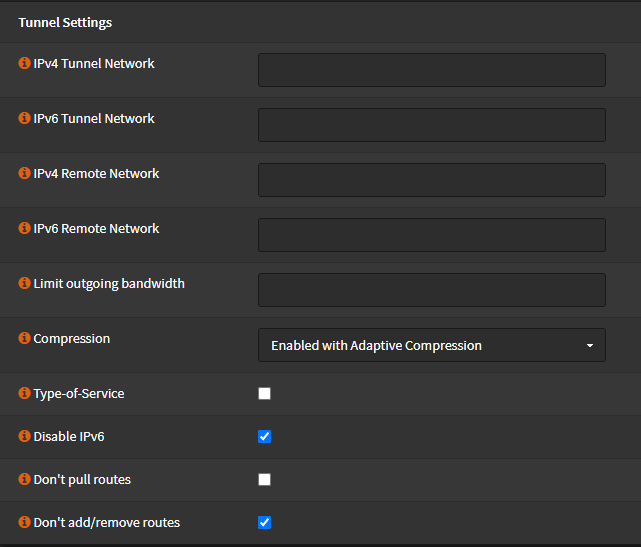
Tunnel settings:
| Field | Value |
|---|---|
| IPv4/IPv6 tunnel network | Empty |
| IPv4/IPv6 remote networks | Empty |
| Limit outgoing bandwidth | Empty |
| Compression | Enable with adaptive compression |
| Type-of-service | Unchecked |
| Disable IPv6 | Checked if IPv6 is not used |
| Don’t pull routes | Unchecked |
| Don’t add/remove routes | Checked |
📂 Screenshot ▼
Advanced configuration: paste:
remote-random;tun-mtu 1500;tun-mtu-extra 32;mssfix 1450;persist-key;persist-tun;reneg-sec 0;remote-cert-tls server;Set Verbosity level to 3 or leave it at 1, then click Save.
2. Add an interface for the VPN
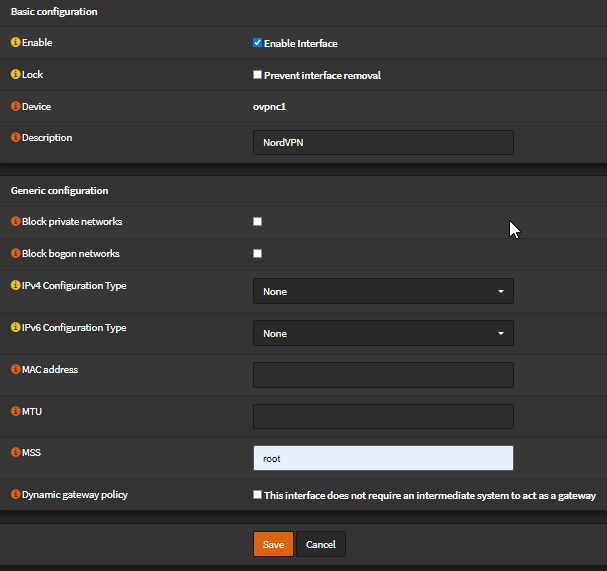
- Open Interfaces → Assignments and click +. The interface is usually named
ovpnc1. - Edit the new interface and enable it.
| Field | Value |
|---|---|
| Description | NordVPN or another useful name |
| Block private networks | Unchecked |
| Block bogon networks | Unchecked |
| IPv4 Configuration Type | None |
| IPv6 Configuration Type | None |
| MAC / MTU / MSS | Empty |
Leave DHCP client configuration unchanged. Click Save and Apply changes.
📂 Screenshot ▼
Configure the firewall and gateway
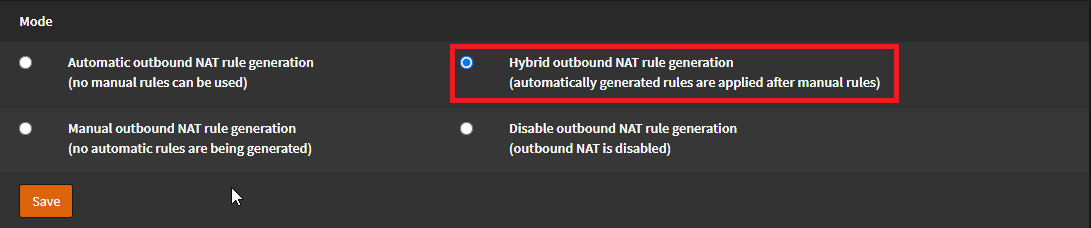
- Open Firewall → NAT → Outbound and select Hybrid outbound NAT rule generation. Save and apply.
- Under Firewall → Rules → VPN_LAN, edit Allow VPN_LAN network and select gateway
NORDVPN_VPNV4under Advanced features.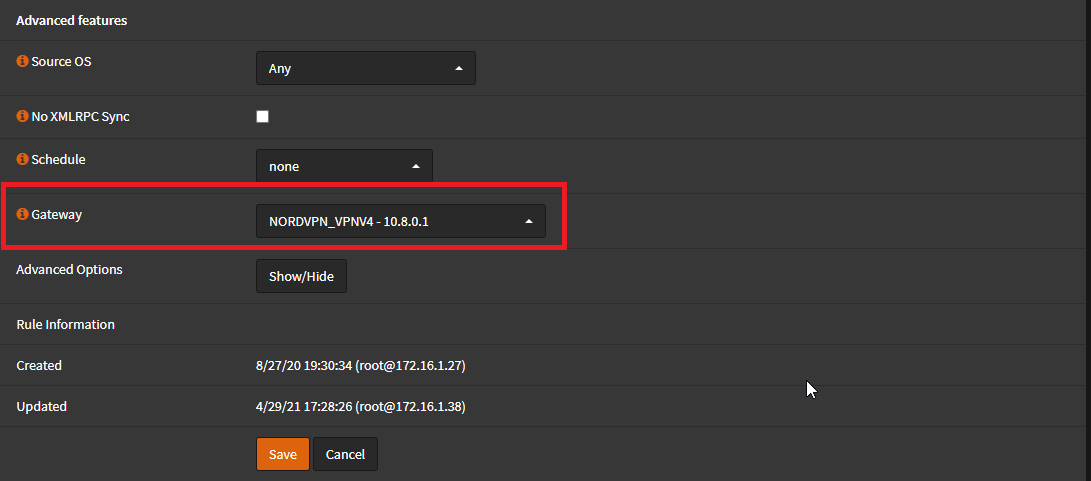
- Add another rule with Source
VPN_LAN netand DestinationVPN_LAN Address, then save and apply. - Open System → Gateways → Single, edit
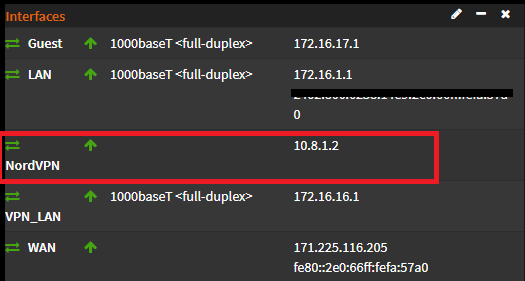
NORDVPN_VPN6, disable it, and apply. - Open VPN → OpenVPN → Connection Status. The connection should show up.
📂 Screenshots ▼

III. Configure the AP and separate VPN Wi-Fi
Follow the OpenWrt AP Mode and Guest VLAN guide, changing the VLAN ID to the one used for VPN_LAN.
Good luck. If you find a missing step or get stuck, leave a comment with the exact screen and error.
Comments & Discussion
Share your thoughts, ask questions and feedback