[OpenHAB] Energy Meter with PZEM004T and ESPHome on ESP32-C3

Nghia Phan
![[OpenHAB] Energy Meter with PZEM004T and ESPHome on ESP32-C3](/images/smarthome/products.png)
Table of Contents
Requirements
- OpenHAB version: 4.3.3
- The MQTT binding is installed.
- PZEM004T v1 (export version) or local V3 — see Shopee.
- An ESP32 or ESP32-C3 SuperMini. For an ESP32-C3 SuperMini, a model with an antenna is recommended (see Shopee).
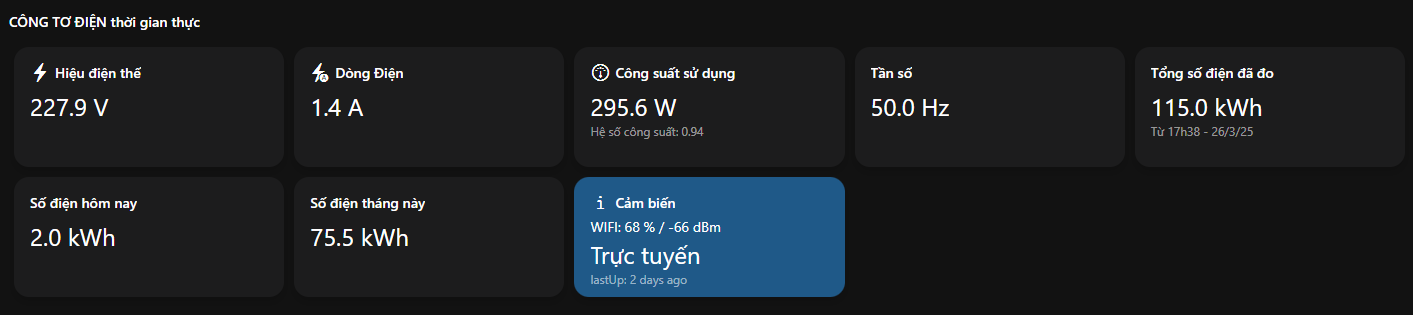
Additional hardware reference
If the current PZEM004T model is unsuitable or you want to compare another version, see another PZEM004T model on Shopee. Before wiring it, verify the exact version, pinout, and module voltage.
Build with ESPHome
- See the ESPHome project here.
- Install ESPHome on your PC using this guide.
- The following configuration publishes data to the MQTT broker every 2 seconds.
esphome: name: pzem004t-mqtt friendly_name: PZEM004T to MQTT min_version: 2025.3.2 name_add_mac_suffix: true platformio_options: board_build.f_flash: 40000000L board_build.flash_mode: dio board_build.flash_size: 4MBesp32: board: esp32-c3-devkitm-1 framework: type: esp-idfuart: rx_pin: 8 tx_pin: 9 baud_rate: 9600modbus:mqtt: broker: "192.168.0.4" username: "user" password: "password" discovery: false discover_ip: falsewifi: ssid: "WIFI SSID" password: "********"ota: - platform: esphome password: "******"logger: level: INFOsensor: - platform: pzemac current: name: "PZEM-004T Current" voltage: name: "PZEM-004T Voltage" energy: # Multiply Energy by 0.001 to convert Wh to kWh. name: "PZEM-004T Energy" filters: - multiply: 0.001 power: name: "PZEM-004T Power" frequency: name: "PZEM-004T Frequency" power_factor: name: "PZEM-004T Power Factor" update_interval: 2s - platform: wifi_signal name: "WiFi Signal dB" id: wifi_signal_db update_interval: 300s - platform: copy source_id: wifi_signal_db name: "WiFi Signal Percent" filters: - lambda: return min(max(2 * (x + 100.0), 0.0), 100.0); unit_of_measurement: "Signal %"- Lines 17-18 configure the RX/TX pins on the ESP32-C3.
- Lines 24-26 configure the MQTT broker.
- Lines 31-32 configure Wi-Fi.
- Line 36 configures the OTA update password.
- Line 58 sets the MQTT broker update interval.
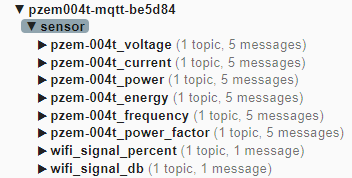
Check the MQTT broker to confirm that it has received the measurements.
Configure the Things in OpenHAB
UID: mqtt:topic:17653025f5:3574a13d85label: PZEM004T Power MonitorthingTypeUID: mqtt:topicconfiguration: {}bridgeUID: mqtt:broker:17653025f5location: Housechannels: - id: PZEM004T_House_Voltage channelTypeUID: mqtt:number label: PZEM004T House Voltage description: "" configuration: stateTopic: pzem004t-mqtt-be5d84/sensor/pzem-004t_voltage/state - id: PZEM004T_House_Power channelTypeUID: mqtt:number label: PZEM004T House Power description: "" configuration: stateTopic: pzem004t-mqtt-be5d84/sensor/pzem-004t_power/state - id: PZEM004T_House_Current channelTypeUID: mqtt:number label: PZEM004T House Current description: "" configuration: stateTopic: pzem004t-mqtt-be5d84/sensor/pzem-004t_current/state - id: PZEM004T_House_Energy channelTypeUID: mqtt:number label: PZEM004T House Energy description: "" configuration: stateTopic: pzem004t-mqtt-be5d84/sensor/pzem-004t_energy/state - id: PZEM004T_House_Freq channelTypeUID: mqtt:number label: PZEM004T House Frequency description: "" configuration: stateTopic: pzem004t-mqtt-be5d84/sensor/pzem-004t_frequency/state - id: PZEM004T_House_PowerFactor channelTypeUID: mqtt:number label: PZEM004T House PowerFactor description: "" configuration: stateTopic: pzem004t-mqtt-be5d84/sensor/pzem-004t_power_factor/state - id: PZEM004T_House_Sensor_Status channelTypeUID: mqtt:string label: PZEM004T House Sensor Status description: "" configuration: stateTopic: pzem004t-mqtt/status - id: PZEM004T_House_Wifi_Sginal_Level_dB channelTypeUID: mqtt:number label: PZEM004T House Wifi Sginal Level dB description: "" configuration: stateTopic: pzem004t-mqtt-be5d84/sensor/wifi_signal_db/state - id: PZEM004T_House_Wifi_Sginal_Level_Percent channelTypeUID: mqtt:number label: PZEM004T House Wifi Sginal Level Percent description: "" configuration: stateTopic: pzem004t-mqtt-be5d84/sensor/wifi_signal_percent/state- BONUS: DSL script to calculate energy consumption for the day, month, and a selected period.
- The results are updated in
Energy_Consumption_Day,Energy_Consumption_Month, andEnergy_Consumption_Period.
- The results are updated in
logInfo("EnergyConsumption", "Current Energy: " + PZEM004T_House_Energy.state.toString + " - " + now.toString) val startOfDay = now.with(LocalTime.MIDNIGHT) val startOfMonth = now.withDayOfMonth(1).with(LocalTime.MIDNIGHT) val startOfPeriod = now.withMonth(4).withDayOfMonth(1).with(LocalTime.MIDNIGHT) // Starts on April 1 val dayAgoValue = PZEM004T_House_Energy.persistedState(startOfDay) val monthAgoValue = PZEM004T_House_Energy.persistedState(startOfMonth) val periodAgoValue = PZEM004T_House_Energy.persistedState(startOfPeriod) val currentEnergy = PZEM004T_House_Energy.state as QuantityType<Number> val dayEnergy = dayAgoValue.state as QuantityType<Number> val monthEnergy = monthAgoValue.state as QuantityType<Number> val periodEnergy = periodAgoValue.state as QuantityType<Number> val dailyConsumption = (currentEnergy.subtract(dayEnergy)).doubleValue val monthlyConsumption = (currentEnergy.subtract(monthEnergy)).doubleValue val periodConsumption = (currentEnergy.subtract(periodEnergy)).doubleValue // Update Items with calculated values Energy_Consumption_Day.postUpdate(dailyConsumption) Energy_Consumption_Month.postUpdate(monthlyConsumption) Energy_Consumption_Period.postUpdate(periodConsumption) Tags:
#openhab
Comments & Discussion
Share your thoughts, ask questions and feedback