Flash International Firmware on ZTE E1600/E2603/E2615

📂 Overview ▼
The ZTE E1600/E2603/E2615 share the same hardware and differ mainly by carrier distribution. They use a ZX279128R CPU, 256MB RAM, and 128MB NAND for Wi-Fi 6 AX1800. In Vietnam, FPT distributes related units under the H3601 (AZ1800) name.
I. Prepare
- A USB-to-TTL adapter using an IC such as CH340, CH340G, or FT232. I use this FT232.
- If you need a device for practice, see the ZTE E1600/E2603/E2615 on Shopee.
- A LAN connection to the PC.
- Three copper probes for the board (1mm copper wire sharpened at one end).
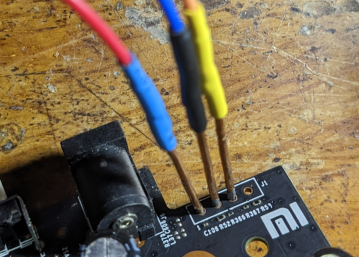
Make sure the probes are secure. Do not touch or move them during the procedure because an open or short connection can damage the board. Soldering the wires is safer when possible.
- Download and extract this archive. It contains
mtd1,mtd2,mtd3,mtd4,mtd5, andupgrade.bin. - Temporarily disable the PC firewall so the TFTP server can work.
II. Connect UART
- Disconnect router power.
- Install MobaXterm on the PC.
- Connect UART to the motherboard as shown.
!!! Do not connect VCC. !!! Be extremely careful not to short GND-VCC or VCC-RX-TX. !!! A careless connection can send voltage directly into the CPU and kill it.
📂 UART wiring diagram ▼
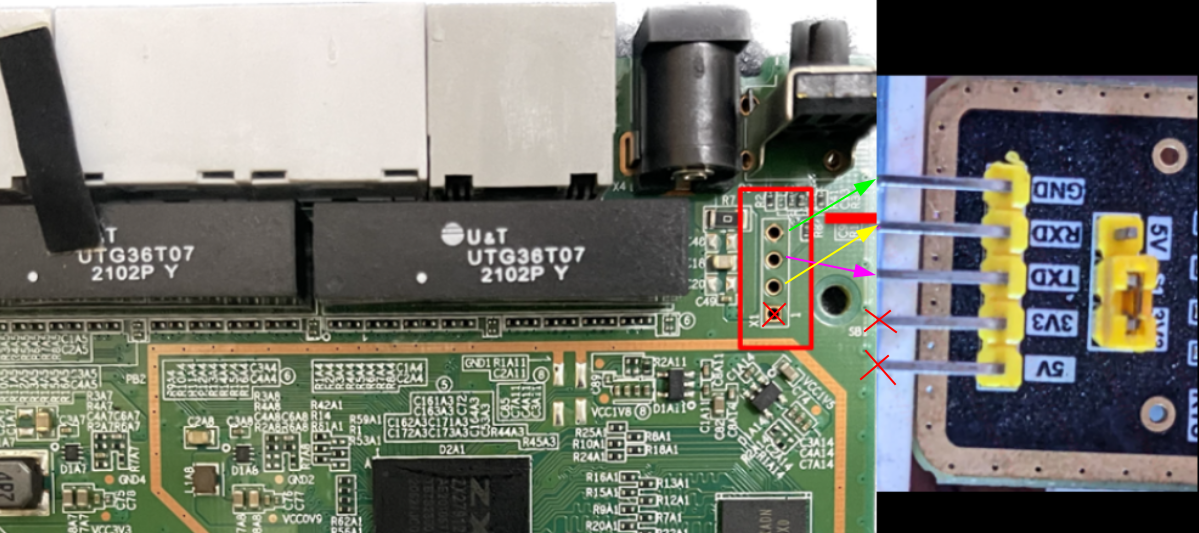 If no log appears, try swapping RX and TX.
After securely connecting the board:
- Connect the USB adapter to the PC and identify its COM port under Device Manager > Ports (COM & LPT).
- In MobaXterm, open Session > Serial, select the COM port, set Speed (bps) to
115200, and click OK. - Power on the router. If UART is connected correctly, many log lines appear. Press
1repeatedly to enter the console until the login screen appears.
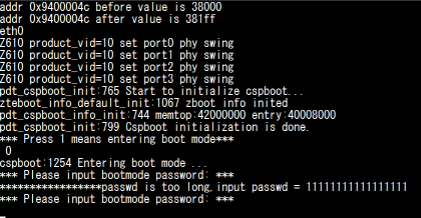
Enter password 5cE080@fyBD exactly, including uppercase and special characters, then press Enter.
III. Flash firmware
- In Windows IPv4 settings, set:
- IP address:
192.168.1.100 - Subnet mask:
255.255.255.0 - Default gateway: Leave empty.
- IP address:
📂 Screenshot ▼
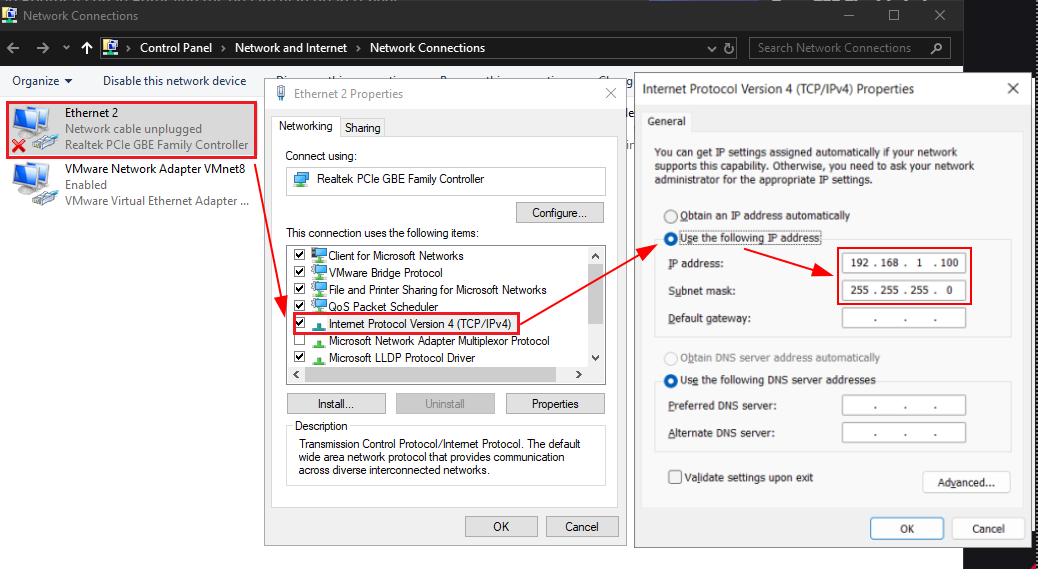
- In MobaXterm, open Server > Server management, open the TFTP server settings, and set its root directory to the folder containing
mtd1–mtd5andupgrade.bin. - Click Play to start the TFTP server. The free version limits runtime; click Play again when it expires.
Type every command exactly and make sure the TFTP server is configured before proceeding.
Enter this command in the console:
tftp 0x42000000 mtd2.binWhen TFTP works, the console shows Loading and many # characters.
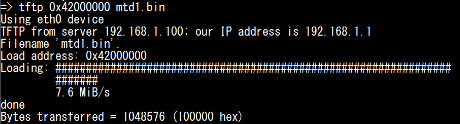
Only after the transfer succeeds, run:
tftp 0x42000000 mtd2.binnand erase 0x100000 0x100000nand write 0x42000000 0x100000 0x200000tftp 0x42000000 mtd4.binnand erase 0x300000 0x200000nand write 0x42000000 0x300000 0x500000tftp 0x42000000 mtd5.binnand erase 0x500000 0x200000nand write 0x42000000 0x500000 0x700000tftp 0x42000000 mtd1.binnand erase 0x0 0x100000nand write 0x42000000 0x0 0x100000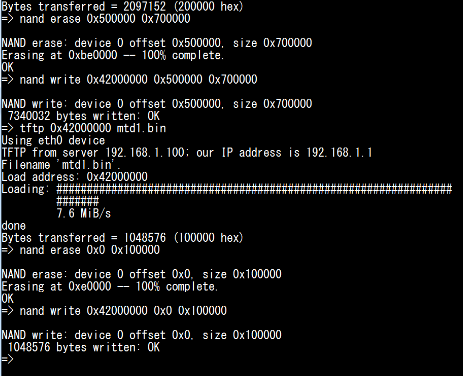
Restart and update firmware through TFTP:
resetImmediately press 1 repeatedly to enter the console and enter Boot4128s! when prompted. Keep the TFTP server running, then enter:
upgrade versionresetThis guide uses FPT firmware FV910P2_VN2, which provides Telnet and allows the serial number to be edited. If several units are used in a LAN Mesh system, their MAC addresses and serial numbers may need to be unique. After editing through Telnet, you can switch to Brazil firmware, which does not provide Telnet.
Factory reset and web upgrade
- After the mesh unit boots, press the upper rear hardware reset button. If the modem does not show a red LED after reset, unplug and reconnect power.
- Set the PC LAN interface back to DHCP and open
192.168.1.1withadmin/Haikui_V2. - Upgrade again through the web interface using
upgrade.binfrom the extracted directory. - Perform another factory reset after the mesh unit boots.
Default access information:
- IP: 192.168.102.1
- User: admin; password: ZTEG37599611
- SSIDs: CDZTech.Com_2.4G_1 / CDZTech.Com_5G_1
- Wi-Fi password: 12345678
This guide references the work by @MinhChungIT on VOZ.VN (original thread).
Good luck.
Comments & Discussion
Share your thoughts, ask questions and feedback