How to Install OpenWrt on the Redmi AX6000

WARNING: These procedures are not for beginners. Proceeding means accepting the risk; I am not responsible for damage, although I will try to help if problems occur.
- There are two procedures for two different OpenWrt layouts:
- Version 1 uses the stock bootloader.
- Version 2 uses U-Boot Mod.
- Requirements:
- A router with SSH enabled (guide).
- Basic command-line skills.
- Careful attention to every command and its order.
- Prepare:
- An Ethernet cable between the PC and router. See this Cat6 cable on Shopee if a separate recovery cable is needed.
- WinSCP for Windows, available here.
- OpenWrt firmware from the official downloads.
I. Install the stock-bootloader OpenWrt version
Download these files from OpenWrt:
xiaomi_redmi-router-ax6000-stock-initramfs-factory.ubixiaomi_redmi-router-ax6000-stock-squashfs-sysupgrade.bin
Open WinSCP:
- File Protocol: SCP
- Hostname: normally
192.168.31.1, port22 - Username: root
- Password: generate the root password from the router SN.
Click Copy to copy the generated password.
📂 SCP login screenshot ▼
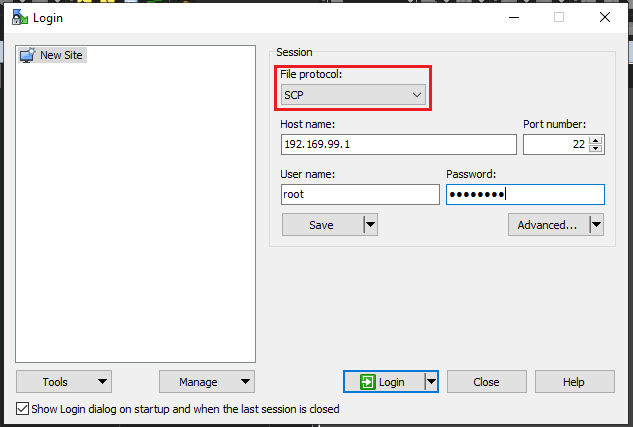
In SCP, double-click the tmp directory on the right and upload openwrt-mediatek-filogic-xiaomi_redmi-router-ax6000-stock-initramfs-factory.ubi.
Log in over SSH and run the commands below in the correct order. Run only the block matching the value returned by cat /proc/cmdline (firmware=1 or firmware=0).
# Click Copy to avoid typing mistakescat /proc/cmdline# Example output: console=ttyS0,115200n1 loglevel=8 firmware=1 uart_en=1# If firmware=1nvram set boot_wait=onnvram set uart_en=1nvram set flag_boot_rootfs=0nvram set flag_last_success=0nvram set flag_boot_success=1nvram set flag_try_sys1_failed=0nvram set flag_try_sys2_failed=0nvram commitubiformat /dev/mtd8 -y -f /tmp/openwrt-mediatek-filogic-xiaomi_redmi-router-ax6000-stock-initramfs-factory.ubireboot# If firmware=0nvram set boot_wait=onnvram set uart_en=1nvram set flag_boot_rootfs=1nvram set flag_last_success=1nvram set flag_boot_success=1nvram set flag_try_sys1_failed=0nvram set flag_try_sys2_failed=0nvram commitubiformat /dev/mtd9 -y -f /tmp/openwrt-mediatek-filogic-xiaomi_redmi-router-ax6000-stock-initramfs-factory.ubirebootAfter reboot, the router address is 192.168.1.1. Log in over SCP at 192.168.1.1:22 (no password), open tmp, and upload openwrt-mediatek-filogic-xiaomi_redmi-router-ax6000-stock-squashfs-sysupgrade.bin.
Log in over SSH and run:
# Set the environment required to boot OpenWrtfw_setenv boot_wait onfw_setenv uart_en 1fw_setenv flag_boot_rootfs 0fw_setenv flag_last_success 1fw_setenv flag_boot_success 1fw_setenv flag_try_sys1_failed 8fw_setenv flag_try_sys2_failed 8fw_setenv mtdparts "nmbm0:1024k(bl2),256k(Nvram),256k(Bdata),2048k(factory),2048k(fip),256k(crash),256k(crash_log),30720k(ubi),30720k(ubi1),51200k(overlay)"# Flash OpenWrtsysupgrade -n /tmp/openwrt-mediatek-filogic-xiaomi_redmi-router-ax6000-stock-squashfs-sysupgrade.binThe stock-bootloader OpenWrt installation is complete.
II. Install the U-Boot Mod OpenWrt version
The router must already be running OpenWrt with the stock bootloader. Incorrect U-Boot steps or a corrupted download can brick it. Verify the network, PC, and file integrity before proceeding.
Prepare:
- xiaomi_redmi-router-ax6000-ubootmod-bl31-uboot.fip
- xiaomi_redmi-router-ax6000-ubootmod-preloader.bin
- xiaomi_redmi-router-ax6000-ubootmod-initramfs-factory.ubi
- xiaomi_redmi-router-ax6000-ubootmod-squashfs-sysupgrade.itb
These links use OpenWrt 23.05.2. Find newer versions at OpenWrt.org.
II.1 Back up the stock-bootloader installation
Log in over SSH and run:
cat /dev/mtdblock0 > /tmp/BL2.bincat /dev/mtdblock1 > /tmp/Nvram.bincat /dev/mtdblock2 > /tmp/Bdata.bincat /dev/mtdblock3 > /tmp/Factory.bincat /dev/mtdblock4 > /tmp/FIP.binUse WinSCP to download these files from tmp to the PC.
II.2 Install U-Boot Mod
II.2.1 Flash initramfs
Upload xiaomi_redmi-router-ax6000-ubootmod-initramfs-factory.ubi to /tmp, then run:
ubiformat /dev/mtd7 -y -f /tmp/ax6000-ubootmod-initramfs-factory.ubirebootAfter reboot, check the partition table:
cat /proc/mtdThe ubi partition must be mtd5.
II.2.2 Unlock the bootloader partition
Official OpenWrt locks the bootloader partition. Install and load kmod-mtd-rw:
opkg update && opkg install kmod-mtd-rwinsmod /lib/modules/$(uname -r)/mtd-rw.ko i_want_a_brick=1Clear persistent logs so OpenWrt does not automatically boot into recovery:
rm -f /sys/fs/pstore/*II.2.3 Format UBI and create U-Boot environment volumes
ubidetach -p /dev/mtd5; ubiformat /dev/mtd5 -y; ubiattach -p /dev/mtd5ubimkvol /dev/ubi0 -n 0 -N ubootenv -s 128KiBubimkvol /dev/ubi0 -n 1 -N ubootenv2 -s 128KiBII.2.4 Flash U-Boot Mod
Upload these files to /tmp:
xiaomi_redmi-router-ax6000-ubootmod-bl31-uboot.fipxiaomi_redmi-router-ax6000-ubootmod-preloader.binxiaomi_redmi-router-ax6000-ubootmod-squashfs-sysupgrade.itb
mtd write /tmp/xiaomi_redmi-router-ax6000-ubootmod-preloader.bin BL2mtd write /tmp/xiaomi_redmi-router-ax6000-ubootmod-bl31-uboot.fip FIPII.2.5 Install U-Boot Mod OpenWrt
sysupgrade -n xiaomi_redmi-router-ax6000-ubootmod-squashfs-sysupgrade.itbThe U-Boot Mod OpenWrt installation is complete.
Comments & Discussion
Share your thoughts, ask questions and feedback