RouterOS v7: Route Clients Through Multiple WANs with Routing Rules

- Configuration goal
- Interfaces in the real configuration
- What is a routing table?
- Default routes for each WAN
- Routing Rules
- Why must internal rules come first?
- Add a new client
- Inspect rules and routes
- When a client cannot reach the LAN
- IPv6 considerations
- Roll back a rule
- Summary
- WinBox illustrations
- Sources
- Footnotes
This article uses a real RouterOS 7.21.5 configuration to demonstrate how individual clients can be routed through multiple WANs. The IP addresses and interface names are kept in the examples so they can be compared with WinBox.
Do not copy the complete configuration to another router. Check interface names, gateways, routing tables, and IP ranges first.
Configuration goal
The goal is to select a WAN for each LAN client:
- Client
10.0.0.10usesVNPT1. - Client
10.0.0.11usesVT2. - Client
10.0.0.12uses themaintable. - Client
10.0.0.15usesVNPT1. - Client
10.0.1.25usesVNPT1.
This is commonly called policy routing or source-based routing: the router selects a path based on the source address instead of using only one shared default route.1
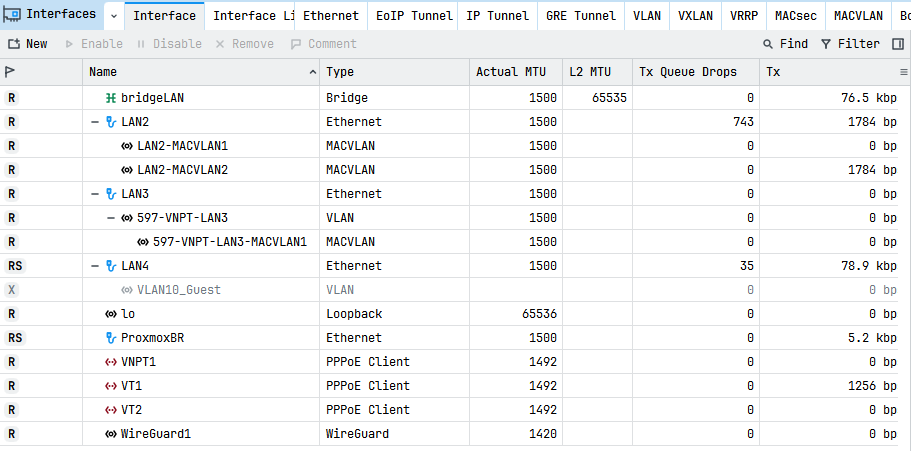
Interfaces in the real configuration
| Interface | Role |
|---|---|
bridgeLAN | Main LAN |
LAN2 | Physical port carrying PPPoE macvlan interfaces |
LAN3 | Physical port carrying VLAN 597-VNPT-LAN3 |
597-VNPT-LAN3-MACVLAN1 | MACVLAN for PPPoE VNPT1 |
LAN2-MACVLAN1 | MACVLAN for PPPoE VT2 |
LAN2-MACVLAN2 | MACVLAN for PPPoE VT1 |
VNPT1 | VNPT PPPoE client |
VT2 | Viettel/VT2 PPPoE client |
VT1 | Other main PPPoE client |
The PPPoE clients are:
/interface pppoe-clientadd add-default-route=yes default-route-distance=3 \ interface=597-VNPT-LAN3-MACVLAN1 name=VNPT1add add-default-route=yes default-route-distance=2 \ interface=LAN2-MACVLAN1 name=VT2add add-default-route=yes interface=LAN2-MACVLAN2 name=VT1The PPPoE username has been removed from this public tutorial. Never publish usernames, passwords, or secrets.
What is a routing table?
RouterOS v7 can create multiple routing tables. Each table can contain a different default route.1
/routing tableadd disabled=no fib name=VNPT1add disabled=no fib name=VT2The fib parameter makes a table available for lookup and forwarding. A table is useful only when it contains suitable routes.
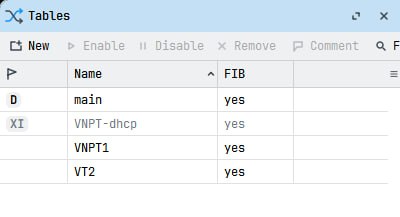
Default routes for each WAN
The VNPT1 table uses the VNPT1 PPPoE interface:
/ip routeadd disabled=no dst-address=0.0.0.0/0 \ gateway=VNPT1 routing-table=VNPT1The VT2 table uses the VT2 PPPoE interface:
/ip routeadd disabled=no dst-address=0.0.0.0/0 \ gateway=VT2 routing-table=VT2Therefore:
- Lookups in
VNPT1use WANVNPT1. - Lookups in
VT2use WANVT2. - Lookups in
mainuse the router’s primary routes.
Inspect the routes:
/ip route print detail where routing-table=VNPT1/ip route print detail where routing-table=VT2/ip route print detail where routing-table=main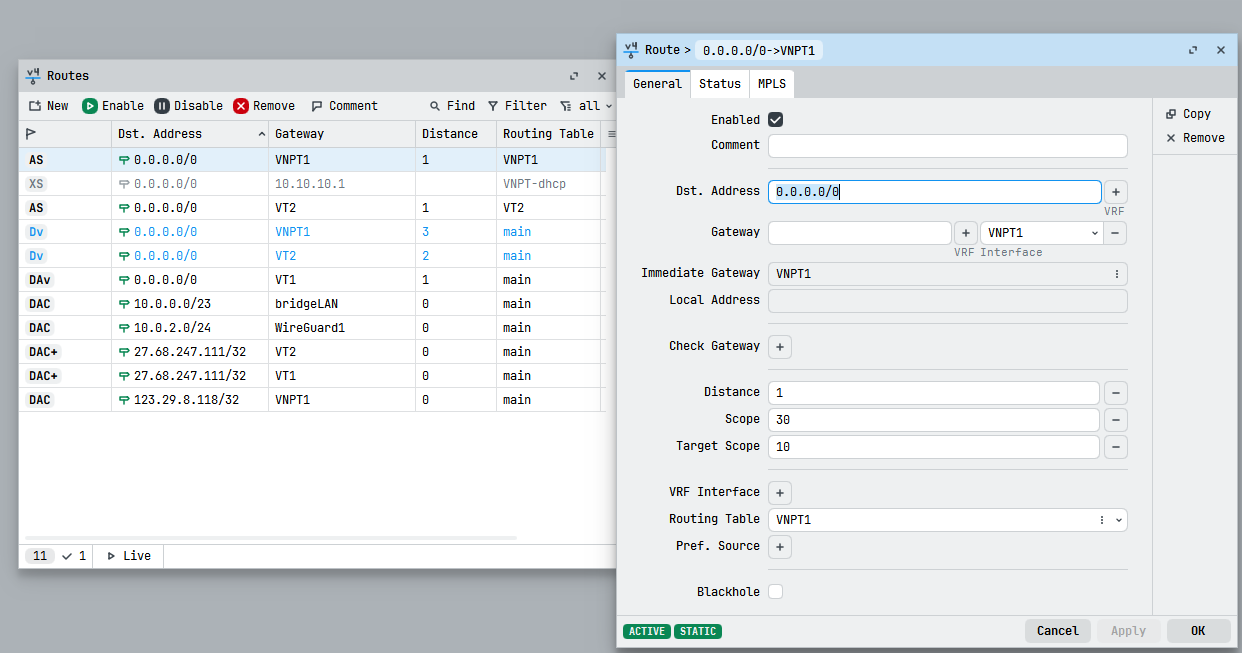
Routing Rules
Internal-network rules are placed before client-specific rules:
/routing ruleadd action=lookup-only-in-table \ comment="LAN IPv4 -> main" \ dst-address=10.0.0.0/23 table=mainadd action=lookup-only-in-table \ comment="WG IPv4 -> main" \ dst-address=10.0.2.0/24 table=mainadd action=lookup-only-in-table \ comment="VLAN10 IPv4 -> main" \ dst-address=10.0.3.0/24 table=mainThese rules keep internal traffic in main instead of sending it through a WAN. This is important for access to Proxmox, OpenHAB, AdGuard Home, and other LAN devices.
Client-specific WAN rules come after them:
add action=lookup-only-in-table \ comment="Socks5_1 -> VNPT1" \ src-address=10.0.0.10/32 table=VNPT1add action=lookup-only-in-table \ comment="Socks5_2 -> VT2" \ src-address=10.0.0.11/32 table=VT2add action=lookup-only-in-table \ comment="Socks5_3 -> main" \ src-address=10.0.0.12/32 table=mainadd action=lookup-only-in-table \ comment="HTTPS Proxy -> VNPT1" \ src-address=10.0.0.15/32 table=VNPT1add action=lookup-only-in-table \ comment="PC LINUX -> VNPT1" \ src-address=10.0.1.25/32 table=VNPT1lookup-only-in-table restricts the lookup to the selected table. If no suitable route exists, the packet may be dropped instead of falling back to another table. This differs from lookup.2
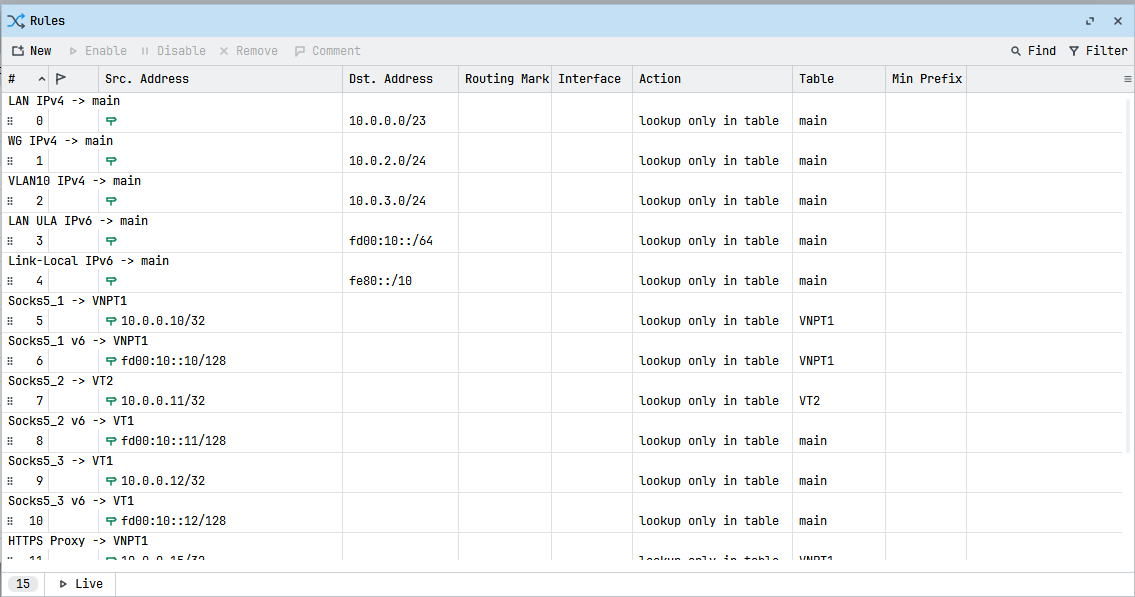
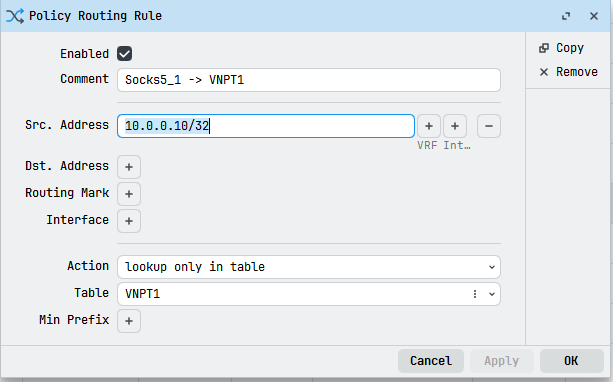
src-address=10.0.0.10/32 with table VNPT1.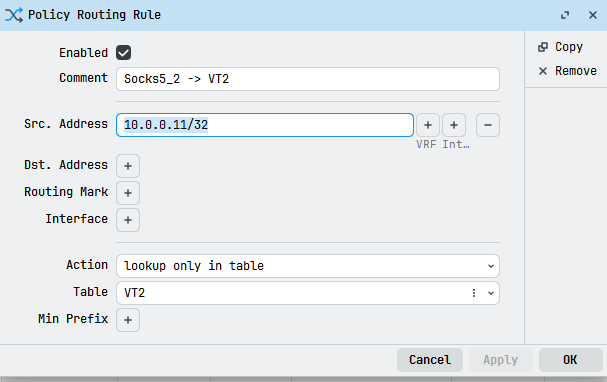
src-address=10.0.0.11/32 with table VT2.Why must internal rules come first?
Suppose 10.0.0.10 is routed through VNPT1. When it accesses 10.0.0.4, the AdGuard Home server, the router must evaluate this rule first:
dst-address=10.0.0.0/23 table=mainWithout the internal rule, the request may be looked up in VNPT1 and sent to the WAN instead of the LAN server.
The conceptual order is:
1. Internal networks → main2. WireGuard/VLAN internal networks → main3. Specific client → desired WAN table4. Other routes → main/default routeAdd a new client
Route 10.0.0.20 through VNPT1:
/routing ruleadd action=lookup-only-in-table \ comment="New client -> VNPT1" \ src-address=10.0.0.20/32 table=VNPT1Route it through VT2 instead:
/routing ruleadd action=lookup-only-in-table \ comment="New client -> VT2" \ src-address=10.0.0.20/32 table=VT2Use /32 for one host. For a subnet, use the appropriate CIDR such as 10.0.1.0/24.
Inspect rules and routes
Print all rules in order:
/routing rule print detailInspect policy-table routes:
/ip route print detail where routing-table=VNPT1/ip route print detail where routing-table=VT2From a client, check the public address:
curl -4 https://ifconfig.meExpected routing in this example:
10.0.0.10 → public IP of VNPT110.0.0.11 → public IP of VT210.0.0.12 → public IP selected by main10.0.0.15 → public IP of VNPT110.0.1.25 → public IP of VNPT1The public address can change, so this is a relative routing test rather than a permanent value.
When a client cannot reach the LAN
If a client can access the Internet but cannot reach 10.0.0.4, 10.0.0.2, or OpenHAB, inspect:
/routing rule print detail/ip route print detail where routing-table=main/ip firewall filter print stats/ip firewall nat print statsThe internal networks in the example are:
10.0.0.0/23 → bridgeLAN10.0.2.0/24 → WireGuard110.0.3.0/24 → VLAN10_GuestEnsure their dst-address rules appear before client src-address rules.
IPv6 considerations
The export also contains IPv6 rules, such as fd00:10::10/128 and fd00:10::25/128. Test IPv4 and IPv6 separately:
/routing rule print detail/ipv6 route print detailA client can use VNPT1 for IPv4 while IPv6 follows another route. If both protocols must use the same WAN, configure and test both rule sets.
The export contains this example:
comment="Socks5_2 v6 -> VT1" \src-address=fd00:10::11/128 table=mainThe comment says VT1, but the actual table is main. Verify such discrepancies on the device before publishing a configuration.
Roll back a rule
Export the rules before editing:
/routing rule export file=routing-rules-before-changeDisable a rule by number:
/routing rule disable <rule-number>Or remove it after confirming the number:
/routing rule remove <rule-number>Do not rely on an old number after adding or removing several rules. Use print detail to confirm the comment and src-address first.
Summary
The policy-routing flow is:
Client source address ↓/routing rule ↓VNPT1 or VT2 routing table ↓Default route through the matching PPPoE interface ↓Selected WANThe difficult part is not adding one more rule; it is ensuring that traffic to internal networks is sent to main before the client-specific WAN rule is applied.
WinBox illustrations
The following images show the interfaces, routing tables, default routes, and routing rules used in this example.
{{< ads >}}
Comments & Discussion
Share your thoughts, ask questions and feedback